
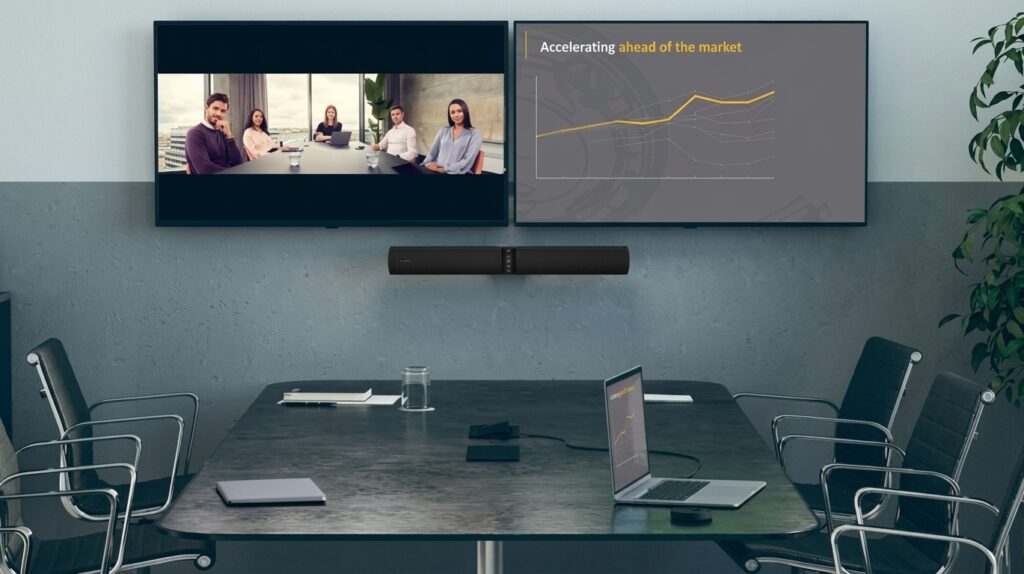

Altia systems panacast 2 camera was a panoramic USB video conferencing camera developed by Altia Systems. Rather than relying on one conventional webcam sensor, the camera used three synchronized imagers and combined their video into a single wide panoramic image.
Its main purpose was simple: capture a much wider view of a meeting space than a traditional webcam.
The original product was designed for plug-and-play use with Windows and Mac computers. It supported USB Video Class technology, allowing compatible applications to recognize the camera without requiring a traditional proprietary camera driver.
Quick Answer
What is the Altia Systems PanaCast 2?
It is a panoramic USB video conferencing camera that combines three camera imagers to produce an approximately 180-degree wide video image, with panoramic 4K output up to 3840 × 1088 and frame rates up to 30 fps.
Why Was PanaCast 2 Different From a Normal Webcam?
A conventional webcam normally focuses on a relatively narrow area directly in front of the lens.
That approach works well for an individual sitting at a desk. It becomes less effective when several people sit across a meeting table because participants at the sides can easily fall outside the frame.
The altia systems panacast 2 camera approached the problem differently. Its three-imager architecture captured separate sections of the room and combined them into a panoramic stream. The original technical material describes real-time video stitching and a 180-degree horizontal viewing area.
This made the camera particularly suitable for:
- Huddle rooms
- Small conference rooms
- Team meetings
- Collaborative workspaces
- Remote presentations
- Video conferencing
- Rooms where participants sit across a wide table
Altia Systems PanaCast 2 Camera Specifications
Here is a detailed specification overview based on the manufacturer’s original technical documentation.
| Specification | PanaCast 2 |
|---|---|
| Product | PanaCast 2 Camera |
| Original manufacturer | Altia Systems |
| Camera architecture | Three-imager array |
| Panoramic resolution | 3840 × 1088 |
| HD resolution | 1920 × 1088 |
| Horizontal field of view | Approximately 180° |
| Vertical field of view | Approximately 54° |
| Diagonal field of view | 188° |
| Maximum frame rate | Up to 30 fps |
| Connection | USB |
| USB support | USB 2.0 / USB 3.0 |
| Video standard | UVC |
| Focus | Fixed focus |
| Focus range | 0.3 m to infinity |
| Latency | ≤5 ms |
| Weight | 125 g |
| Width | 60 mm |
| Height | 25 mm |
| Length | 74 mm |
| Operating temperature | 0°C to 40°C |
| Operating humidity | 15%–85%, non-condensing |
| Built-in features | Motion JPEG, color controls, auto 50/60 Hz detection |
| Microphone | HD stereo microphone in the original system documentation |
The unusually wide field of view is the defining specification. The camera was designed around room coverage rather than the narrow framing typical of desktop webcams.
How Does the 180-Degree Field of View Work?
The biggest attraction of the altia systems panacast 2 camera is its panoramic coverage.
The camera uses three separate imagers rather than depending on a single wide-angle lens. These image streams are processed and stitched together to create a single panoramic view. This approach allows the system to cover a much wider section of a room while reducing the extreme fisheye appearance associated with many conventional ultra-wide lenses.
The result is useful when participants sit from one side of a conference table to the other.
Instead of repeatedly moving the camera, the wide view can keep more people visible simultaneously.
Is the PanaCast 2 Really 4K?
Yes, but the terminology deserves some attention.
The original specifications list a Panoramic-4K resolution of 3840 × 1088. The system could also output an HD format of 1920 × 1088.
This is different from the common 16:9 3840 × 2160 UHD format that many modern cameras advertise as 4K.
The PanaCast 2’s panoramic resolution uses a much wider aspect ratio because the camera’s purpose is to cover a broad horizontal area. Therefore, calling it panoramic 4K is more informative than comparing it directly with a conventional 16:9 4K webcam.
What Makes the Three-Camera Design Useful?
The three-camera architecture is central to the product.
Each imager captures part of the scene, and the system combines those images into one panoramic output. The original Altia documentation describes this as combining video streams from three imagers simultaneously.
This design provides several practical benefits:
- Wider room coverage
- More natural framing
- Better visibility for groups
- Reduced need for camera movement
- Useful coverage in small collaboration rooms
- A single panoramic output for compatible video applications
For a meeting room, this can be more useful than simply increasing the resolution of a narrow camera.
Does the PanaCast 2 Need Special Software?
The altia systems panacast 2 camera was designed to operate as a UVC-compliant USB device.
That means compatible computers and applications can recognize it as a standard video device. The original setup documentation states that the camera could work with Windows and Mac systems without additional drivers.
The setup process was therefore relatively straightforward:
- Place the camera on its stand or wall mount.
- Connect the power adapter.
- Connect the USB cable to the computer.
- Open the video conferencing application.
- Select PanaCast as the video source.
- Check framing and camera positioning.
- Start the meeting.
The original setup guide also recommended positioning the camera roughly 4–6 feet above the floor and at least 3 feet from the nearest participant.
Which Video Conferencing Apps Can PanaCast 2 Use?
The original setup documentation lists compatibility with several collaboration platforms, including Skype, Skype for Business, Cisco WebEx, Citrix GoToMeeting, Zoom, BlueJeans, and Google Hangouts.
Because the camera uses UVC video, application compatibility depends on whether the computer and conferencing software can accept a standard USB video source.
However, buyers should distinguish historical compatibility from guaranteed compatibility with current versions of modern applications.
This is especially important because the PanaCast 2 is an older product.
What Is Intelligent Zoom?
Altia Systems also offered an Intelligent Zoom software capability for PanaCast 2.
The technology could use face detection and automatic framing to adjust the camera view. The associated technical documentation lists up to 3× digital zoom, automatic pan and zoom, a 180-degree field of view, and face detection up to 12 feet.
This feature addressed a common problem with panoramic cameras.
A very wide image can show everyone, but people may appear relatively small. Intelligent Zoom could narrow the view around detected participants while retaining the panoramic camera’s underlying coverage.
How Should You Position the Camera?
Correct positioning matters almost as much as camera specifications.
The original PanaCast 2 setup guide recommends placing the camera approximately 4–6 feet above the ground. It also recommends keeping the nearest participant at least 3 feet away from the camera.
A good installation should consider:
- Participant seating
- Display location
- Room depth
- Window placement
- Lighting
- Camera height
- USB cable length
- Power availability
Avoid pointing the camera directly toward a very bright window whenever possible. Strong backlighting can make faces harder to see, even when the camera itself has a wide field of view.
What Comes With the PanaCast 2?
Original documentation lists the following equipment:
- PanaCast 2 camera
- USB 3.0 cable
- Power adapter
- Table stand or wall mount, depending on configuration
- Quick reference/setup documentation
The exact package can vary depending on the particular model or bundle being sold.
If purchasing a used unit, verify that the required power supply, USB cable, and mounting hardware are included.
Altia Systems PanaCast 2 vs. a Standard Webcam
A direct comparison shows why the camera attracted attention.
| Feature | PanaCast 2 | Typical Standard Webcam |
|---|---|---|
| Primary purpose | Group video conferencing | Individual video calls |
| Field of view | Approximately 180° horizontal | Usually much narrower |
| Multi-imager design | Yes | Usually no |
| Panoramic output | Yes | Usually no |
| 4K-class panoramic output | Yes | Depends on model |
| USB connection | Yes | Yes |
| UVC support | Yes | Common |
| Automatic framing | Available with Intelligent Zoom | Depends on model |
| Huddle-room use | Excellent fit | Depends on FOV |
| Desk use | Possible | Usually better suited |
| Room-wide group coverage | Major strength | Often limited |
The important point is that higher resolution alone does not solve a framing problem.
If six people sit around a table, a wider field of view can provide more practical value than simply moving from one resolution level to another.
Is the PanaCast 2 Still Worth Buying?
The answer depends heavily on price, condition, compatibility, and intended use.
The altia systems panacast 2 camera was innovative for its generation, but it is not a current-generation camera. Anyone considering one today should evaluate it as an older professional video-conferencing device rather than comparing it only with modern consumer webcams.
It may make sense when:
- You find a clean used unit at a low price.
- Your room benefits from a 180-degree view.
- Your computer supports its connection requirements.
- Your conferencing software recognizes the camera.
- You need wide group coverage more than modern AI features.
- Replacement accessories are available.
Think carefully when:
- You need current manufacturer support.
- You require modern USB-C connectivity.
- You want current AI framing features.
- You need HDR or newer image-processing capabilities.
- You need guaranteed compatibility with modern meeting-room platforms.
For a business deployment, current support and lifecycle status can matter more than the original specifications.
What Happened to Altia Systems?
This is an important part of the product’s history.
GN Audio announced its agreement to acquire Altia Systems in February 2019, and the acquisition was completed in March 2019. Altia’s PanaCast technology became part of GN Audio’s video collaboration strategy under the Jabra brand.
Jabra subsequently launched its own PanaCast product in June 2019, combining panoramic video technology with Jabra’s audio expertise.
That history explains why shoppers may encounter both Altia PanaCast 2 and Jabra PanaCast products when researching the same technology family.
They should not automatically be treated as identical products.
Altia PanaCast 2 vs. Jabra PanaCast
The relationship between the products can be confusing.
| Category | Altia PanaCast 2 | Jabra PanaCast |
|---|---|---|
| Original developer | Altia Systems | Jabra / GN Audio |
| Product era | Earlier generation | Later generation |
| Panoramic video | Yes | Yes |
| 180° view | Yes | Yes |
| Multi-camera technology | Yes | Yes |
| USB video conferencing | Yes | Yes |
| Intelligent features | Available through optional software | Expanded intelligent vision capabilities |
| Brand history | Altia Systems | Jabra |
| Acquisition connection | Acquired by GN Audio | Developed after acquisition |
GN’s acquisition documentation confirms that Altia’s core technology involved real-time 180-degree panoramic video from integrated multi-camera arrays.
This makes the PanaCast 2 an important predecessor in the development of Jabra’s later video collaboration portfolio.
What Are the Main Advantages?
The strongest benefit of the altia systems panacast 2 camera is its room coverage.
Major strengths
- Very wide field of view: Approximately 180 degrees horizontally.
- Panoramic video: Designed specifically for meeting-room coverage.
- Three-imager architecture: Combines multiple camera views.
- USB connectivity: Designed for straightforward computer integration.
- UVC support: Helps simplify device recognition.
- Compact design: The camera itself weighs only 125 g.
- Optional Intelligent Zoom: Provides automatic framing capabilities.
- Low latency: Original specifications list latency of 5 ms or less.
These characteristics explain why the camera was particularly interesting for small collaboration rooms.
What Are the Limitations?
The camera also has limitations that buyers should understand.
First, the product is from an older generation. Current video conferencing cameras may offer more advanced image processing, USB-C, HDR, AI framing, newer operating-system support, and stronger ongoing software ecosystems.
Second, the panoramic 4K format should not be confused with modern 3840 × 2160 16:9 video.
Third, used units require additional attention. A low purchase price is less attractive if the camera is missing its power adapter, mounting hardware, or compatible accessories.
Finally, historical software compatibility does not guarantee compatibility with every current conferencing platform.
Who Should Consider the PanaCast 2?
The altia systems panacast 2 camera is best understood as a room-focused video solution rather than a standard desktop webcam.
It can be useful for:
- Small businesses
- Huddle rooms
- Conference spaces
- Training rooms
- Remote collaboration
- Hybrid meetings
- Organizations evaluating used professional AV equipment
It is less compelling for someone who simply needs a modern webcam for one person.
For an individual desk user, a contemporary USB webcam may provide easier installation and newer image-processing features at a lower cost.
How to Troubleshoot PanaCast 2
If the camera is not appearing in a conferencing application, start with the basics.
Check the connection
Make sure both the power cable and USB cable are securely connected. The original troubleshooting guide specifically recommends checking both connections when the camera is not detected.
Select the correct camera
Open the video settings inside your conferencing application and make sure PanaCast is selected as the video device.
Check USB connectivity
Try another compatible USB port if the computer does not detect the camera.
Check lighting
If the video appears dark or faces look poorly exposed, check whether the camera is facing a bright window or strong light source.
Test another application
If possible, test the camera with another UVC-compatible video application. This can help determine whether the problem comes from the camera, computer, USB connection, or conferencing software.
Frequently Asked Questions
1. What is the field of view of the Altia Systems PanaCast 2?
The altia systems panacast 2 camera provides approximately 180 degrees horizontally and 54 degrees vertically, with an approximately 188-degree diagonal field of view.
2. Is the PanaCast 2 a 4K camera?
Yes. Its original specifications identify a panoramic resolution of 3840 × 1088, described as Panoramic-4K. This is a wide panoramic format rather than conventional 3840 × 2160 16:9 UHD.
3. How many cameras are inside PanaCast 2?
The system uses three imagers and combines their video streams into a panoramic output.
4. Does PanaCast 2 work with USB?
Yes. The original product supports USB 2.0 and USB 3.0 and uses UVC technology for compatible computer systems.
5. Is Altia Systems still the company behind PanaCast?
No. GN Audio acquired Altia Systems in 2019. The PanaCast technology subsequently became part of Jabra’s video collaboration portfolio.
6. Is the PanaCast 2 good for conference rooms?
Yes, particularly when wide room coverage is the priority. Its 180-degree panoramic view was specifically designed to capture groups in huddle rooms and small collaboration spaces.
Final Verdict
The altia systems panacast 2 camera remains an interesting piece of video conferencing technology because it solved a practical problem with an intelligent hardware design.Instead of relying on a narrow single-camera view, it used three imagers and real-time stitching to create an approximately 180-degree panoramic image.
Its 3840 × 1088 panoramic output, USB connectivity, UVC support, low latency, and optional Intelligent Zoom made it well suited to small meeting rooms when it launched.
However, buyers in 2026 should consider its age and availability of support before choosing it for a new business installation. For an existing unit or an inexpensive used purchase, it can still be an effective wide-angle conferencing solution when compatibility checks out.
If you are comparing it with newer Jabra PanaCast models, focus on more than resolution. Compare field of view, room size, microphone requirements, software support, connectivity, automatic framing, warranty, and long-term availability. That approach will help you choose the camera that actually fits your meeting room rather than simply choosing the model with the biggest specification number.